

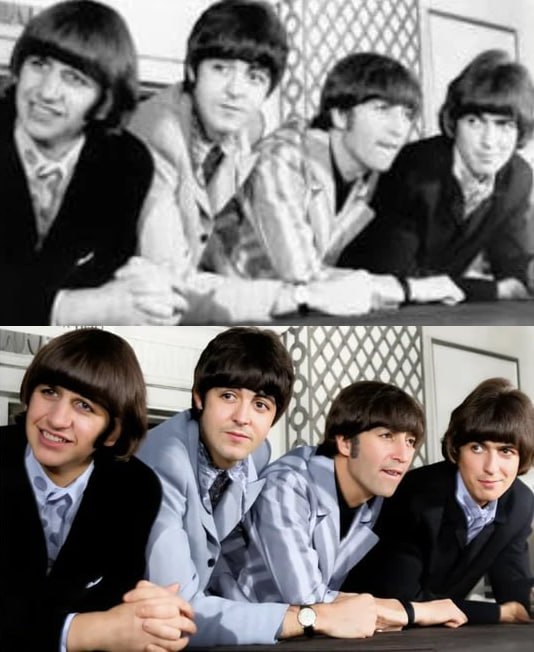
Old photos hold precious memories. But many get scratched, torn, or faded over time. Fixing these pictures can be hard without the right tools. Luckily, today we have AI tools that help restore historical photographs easily. These tools use smart technology for automatic photo restoration for old images. They bring back the charm of your vintage photos. If you want to enhance your old pictures, a vintage photo enhancement tool is a great choice.
This article will guide you through the top 5 AI tools to fix scratched or torn old photos. These tools can save your memories with simple clicks. They are easy to use and work fast. Plus, they help improve the quality of photos without much effort.
Why Use AI Tools for Old Photo Restoration?
AI tools are smart. They can see the damaged parts of a photo and fix them. This saves you time and work. You do not need to learn hard software. Also, these tools can add color to black and white photos. Some can even sharpen blurry images. This is why an AI photo repair tool is very useful.
With an AI-powered old photo fixer, you get more than just fixing scratches. You get a tool that understands old photos well. It helps bring back the life in your pictures. If you want to add colors, you can use an AI photo colorizer for old images. This makes your old photos look fresh and new.
Top 5 AI Tools to Fix Scratched or Torn Old Photos
| Tool Name | Main Features | Best For |
|---|---|---|
| 1. Remini | Enhances photo quality, removes scratches, adds colors | Quick fixes and colorizing black and white photos |
| 2. VanceAI Photo Restorer | Repairs cracks, restores old photos automatically, sharpens images | Detailed repair of torn or damaged photos |
| 3. MyHeritage Photo Enhancer | Enhances faces, fixes scratches, colorizes vintage photos | Family photos and historical image restoration |
| 4. Hotpot AI Old Photo Restorer | Restores old photos, removes noise, adds colors with AI | Users who want easy online restoration |
| 5. Pixbim Color Surprise AI | Automatic colorizing of black and white photos, fixes damages | Bringing life to vintage black and white images |
1. Remini
Remini is popular for its easy and fast photo fixes. It uses AI to repair scratches and improve photo quality. You can also use it as an AI photo restoration for archives. This makes black and white photos bright and colorful. The tool works well on old family pictures. It is perfect if you want quick restoration on your phone or computer.
2. VanceAI Photo Restorer
VanceAI is a strong tool for fixing torn or heavily damaged photos. It uses AI to remove cracks and restore colors automatically. This AI-powered old photo fixer sharpens blurry photos too. It is great for people who want detailed repair work. The tool works online, so no need to download software.
3. MyHeritage Photo Enhancer
This tool is made for restoring old family and historical photos. It enhances faces, clears scratches, and adds colors. It is also an AI photo repair tool that works well on faded images. The tool is simple to use. If you want to preserve your family history, this is a good choice.
4. Hotpot AI Old Photo Restorer
Hotpot is an easy online tool for fixing old photos. It removes noise and scratches automatically. You can also add color to black and white pictures. This vintage photo enhancement tool is user-friendly. It is good for beginners who want a quick fix without much effort.
5. Pixbim Color Surprise AI
This tool focuses on adding color to black and white photos. It also repairs some damage like scratches and torn parts. Pixbim uses AI to make old photos look fresh. The tool is best for those who want to bring life to vintage images with color.
How to Choose the Best AI Tool for You?
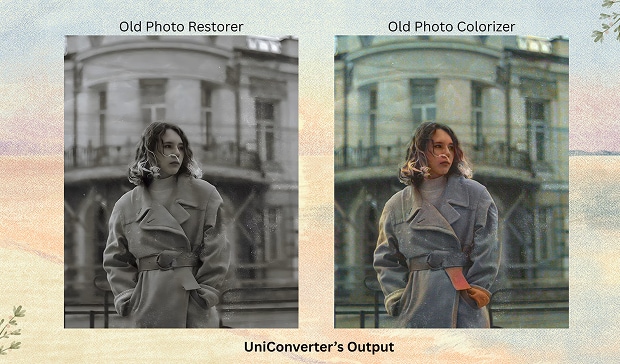
When picking a tool, think about what you want.
-
Do you want to fix scratches only?
-
Do you also want to add color?
-
Is it easy to use?
-
Do you want a free or paid service?
Some tools are better for quick fixes. Others work well for detailed restoration. If you want color, choose a tool with AI photo colorizer for old images. For heavy damage, pick one with strong repair features. Most tools offer free trials. Try a few before deciding.
Tips for Restoring Old Photos with AI Tools
-
Scan your old photos in high resolution for best results.
-
Use clean and clear images to help AI detect damages.
-
Try different tools to see which one works best for your photo.
-
Save a copy of the original photo before editing.
-
Be patient; some tools take time to process photos fully.
Conclusion
Old photos are treasures. Fixing scratches and tears helps keep memories alive. AI tools make photo restoration easy and fast. They also add color and sharpness. Whether you want to restore historical photographs or just fix a torn picture, there is a tool for you.
Use an AI photo repair tool or AI-powered old photo fixer to save your photos. Try a vintage photo enhancement tool for better colors and detail. With these top 5 AI tools, you can bring your old photos back to life. Start restoring your memories today!